May 16, 2008

Brand Yourself on Your Blog, in Your Feed, with a Photo and Sig Line

In my blog post about the importance of your avatar in social media marketing, I included my headshot photo to show folks what I use as my avatar on social media sites:

Stephan Spencer avatar

Seeing this in my post gave one of my readers, Dave Dugdale, the idea to append his photo to the end of posts on his blog’s RSS feed. That is a great idea. That headshot image of me appears only in my aforementioned post because I added it by hand. It certainly wouldn’t be hard to automate it so that your image (and byline, and links) would appear on ALL your posts. Then, folks using RSS readers and website aggregators like Bloglines and Google Reader will see this photo and byline while reading your post, helping brand you and letting people know who you are. You, as the author, will appear more real, more tangible, more human, to the reader. S/he will relate to you more as a fellow human being, take notice of you, remember you, and listen to what you have to say. S/he may even then recognize you at conferences and introduce herself/himself to you (this has happened to me on many occasions!).

Another important benefit of this tactic is that it somewhat thwarts content thieves who “repurpose” your blog post content on their blogs. If they are scraping from your RSS feed, they will be putting up your photo, byline, and links on all the posts they stole from you! (By the way, if they are scraping your HTML — which won’t be nearly as common — then the photo and byline would need to appear on your blog site, not just your feed.)

So how do you accomplish this — putting a sig line containing your image/avatar on all your posts? You could add the sig line to your template (theme) files. But there are other, easier ways. For instance, if you’re running WordPress, there’s the RSS Footer plugin or the WP-Avatar plugin.

Or, if you’re using the excellent Feedburner service for your RSS feed, there’s the “Feed Image Burner” tool.

You can also put a tiny image of yourself into your blog’s favicon too, which will cause it to show up next to your blog’s name on many RSS readers. That’s what I’ve done on my blog. Here’s what it looks like: favicon

If you don’t have a custom favicon, don’t know how to create one, or don’t know what I’m talking about, then you should read my post Favicon and Robots.txt – Must-Haves for your Blog.

Windows Desktop Blogging Software

Posted by: Lee Odden of Online Marketing Blog on 05/17/07

Sometimes, writing blog entries via a web form just doesn’t work. That’s why I’m looking forward to Mariner Software’s new blogging client called WinJournal. The WinJournal name might be familiar since Mariner Software also created MacJournal.

Currently in beta testing mode, WinJournal offers journaling, blogging and podcasting in one application. The blogging capabilities work with all popular Windows blogging software including: MovableType, TypePad, Wordpress, Live Journal, Blogger and Windows Spaces. WinJournal also allows you to publish blog entries to a web server via FTP so it can be used as a web site editor as well. WinJournal can also be used to write entries stored locally.

Other options include: wiki style links, spell check, auto save, security/encryption, WYSIWYG text editor, calendar, multiple journals, labels, full screen mode and tabs. There is also a skins manager to change the look an feel of the WinJournal software. This is a good thing since the default skin under XP isn’t so good.

Other popular desktop blogging software includes: Qumana, , , , , Rocket Post 2 and Zoundry. Thomas has a short review on desktop and web based browsers at OMB.

Technorati Adds Authority Metric

Posted by: Lee Odden of Online Marketing Blog on 05/11/07

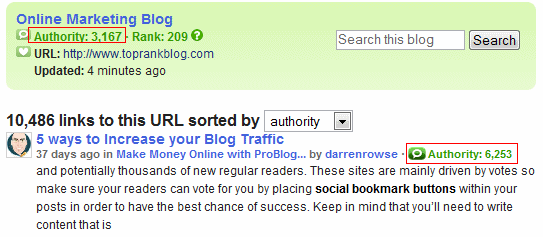
Technorati launched a blog authority widget last month but now that Authority score is showing up next to blog search results and on a new and improved blog profile page. I’ve been paying a lot more attention to Technorati since Online Marketing Blog the top 100 Favorites list and made an appearance on the top 100 Popular blogs list recently.

Basically, the Authority score is based on the number of blogs linking to your blog within a certain period of time. I had someone ask me if they should start promoting their blog differently in order to up their “Authority” score. My recommendation is, don’t do anything that isn’t going to further the main goals of the blog. Getting on a list that can send you traffic and build credibility is nice, but if those visitors don’t respond well to your content, they’re just drive by traffic.


Syndicate:

RSS RSS Feed


Posts via e-mail

Enter your email address:

Delivered by FeedBurner

Recent Posts:

Archives:

Buzz Cloud:

Recent Readers:

Tag Cloud:

Categories: